Set Registration Eligibility Criteria in BlueGolf 360
When setting up tournament registration, it’s important to define eligibility criteria to ensure that only qualified players are able to sign up.
Access Eligibility Settings
Within the tournament:
- Navigate to the Registration tab
- Select the Setup sub-tab
- Locate the Eligibility Criteria card and click Edit


Eligibility Settings Overview
Below is a breakdown of each available setting:
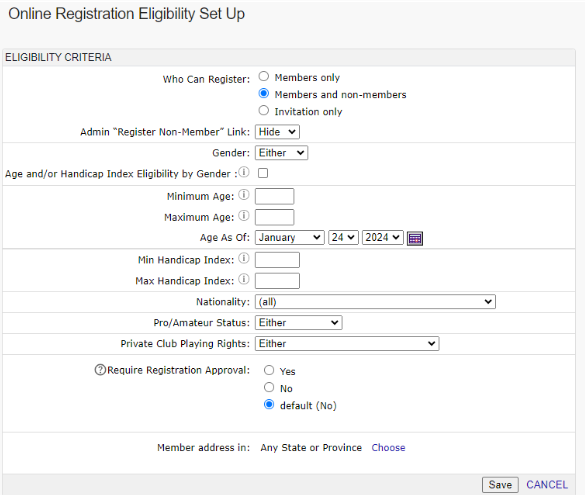
Who Can Register
Defines who is allowed to register for the tournament:
- Members Only – Only members of the organization can register
- Members & Non-Members – Open registration for all players
- Invitation Only – Only players on a designated invitation list can register
Admin “Register Non-Member” Link
Allows administrators to manually register non-members, even if general registration is restricted.
Gender
Restrict registration based on gender:
- Male only
- Female only
- Open to all
Minimum / Maximum Age
Set age restrictions for the tournament.
You can define both a minimum and maximum age, along with the “age as of” date.
Minimum / Maximum Handicap
Set an eligible handicap index range for participants.
Nationality
Use the dropdown menu to restrict eligibility to a specific nationality, if applicable.
Pro / Am Status
Determine player status eligibility:
- Professionals only
- Amateurs only
- Open to both
Require Registration Approval
Controls whether registrations must be reviewed:
- Yes – Administrators must approve each registration
- No – Registrations are automatically accepted
Was this article helpful?
That’s Great!
Thank you for your feedback
Sorry! We couldn't be helpful
Thank you for your feedback
Feedback sent
We appreciate your effort and will try to fix the article