One of the steps when using DotGolf is to update indexes to get the most recent index information pulled for each player.
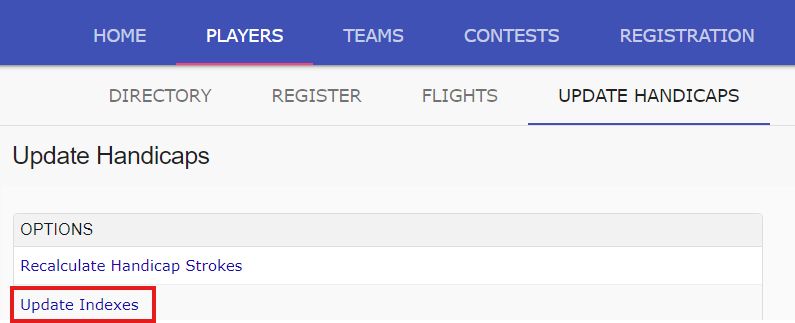
Once tournament registration is complete, and all players are added to the tournament, select the players tab, and the sub-tab "Update Handicaps":

Next, select the "Update Indexes" link:
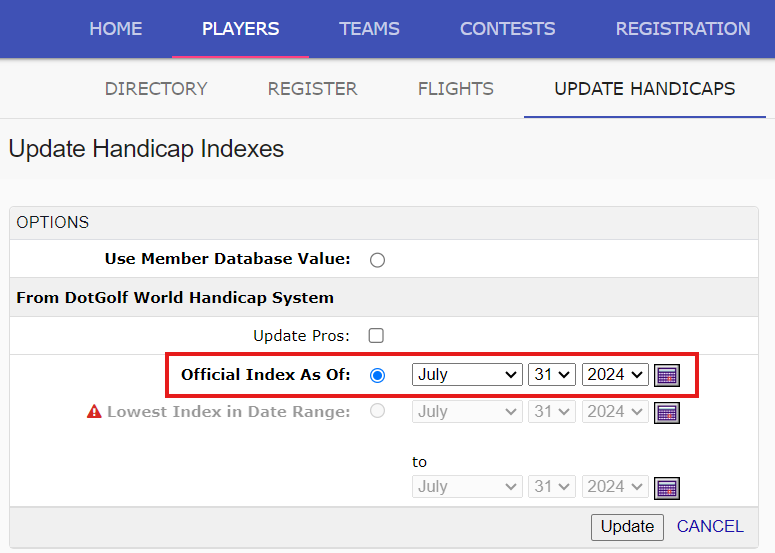
To update indexes, use the "Official Index as of" option. Select a date (typically day of, or day before the tournament), and select UPDATE:
Once the job is completed, all indexes will be updated in the tournament field.
Was this article helpful?
That’s Great!
Thank you for your feedback
Sorry! We couldn't be helpful
Thank you for your feedback
Feedback sent
We appreciate your effort and will try to fix the article