Once the tournament is created, the club access is approved, and the tees are added in the tournament, the next step with a DotGolf integration is to "Map BlueGolf Tees to DotGolf tees".
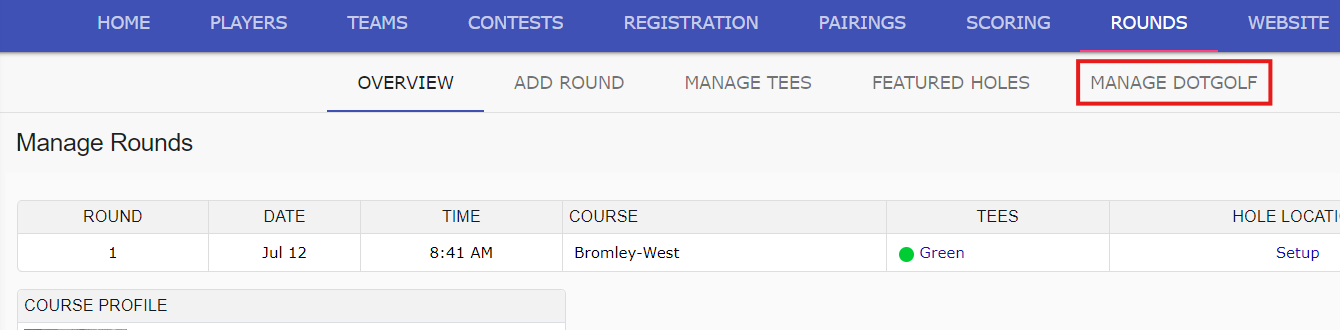
Within the rounds tab, select "Manage DotGolf:
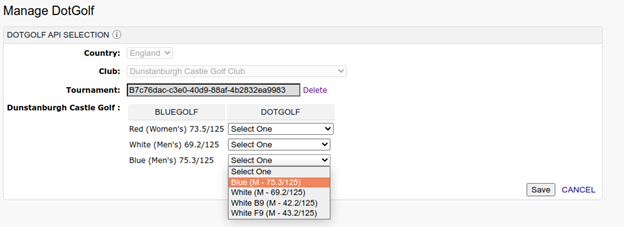
Use the DotGolf column dropdown to select the DotGolf tee that will be mapped to the existing BlueGolf tee. The DotGolf tee should be the same color, gender and slope/ rating:
When the tees are initially mapped, the tee dropdown disappears, and becomes read-only. If the tee marker in DotGolf becomes invalid, or the tee information differs from what is in BlueGolf, a warning sign will be shown on the manage tees page:
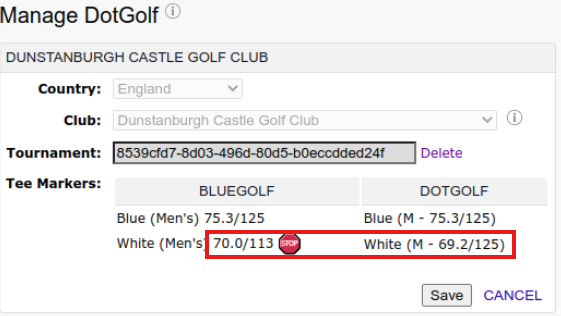
In this scenario, the tee being used within the tournament should be updated to match DotGolf tee information.
Was this article helpful?
That’s Great!
Thank you for your feedback
Sorry! We couldn't be helpful
Thank you for your feedback
Feedback sent
We appreciate your effort and will try to fix the article