With a DotGolf integration, an additional score posting option has been added to allow for proper fourball score posting. To allow for fourball score posting, there are certain rules that need to be followed to post as a team score. Below are the requirements:
Contest / Tournament Setup:
- 2 Person Teams must be established
- Must Be Team Stableford Scoring (Net)
- 85% Handicap needs to be set up.
- Can not have an individual Strokeplay played concurrently within the same event. If so, the scores will be posted as a Stroke Play event. (Team Event must be the only event.)
Once the tournament setup is established, for scores to post successfully, the following requirements must be met:
- Must have 9 holes/scores to post to handicapping
- Team score of 42 or more (Stableford points)
- Individual score of 36 or more points
- If all of those are true, the scores will post as a better ball team post.
Score Posting Process
Once the tournament is complete, and scores are ready to be posted locate the scoring tab, and the sub-tab "Post":

Within the score posting screen, a new “Post as Fourball” checkbox will now display when the contest is setup within the posting requirements. Use this checkbox to post:
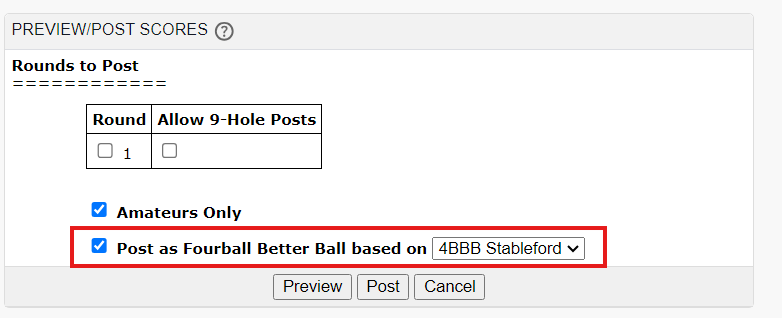
Preview the score posting results. Once comfortable, select POST.
Score Posting Preview & Scenarios
When previewing the score posting results, and new score posting table will now be available to check which scores will be posted:
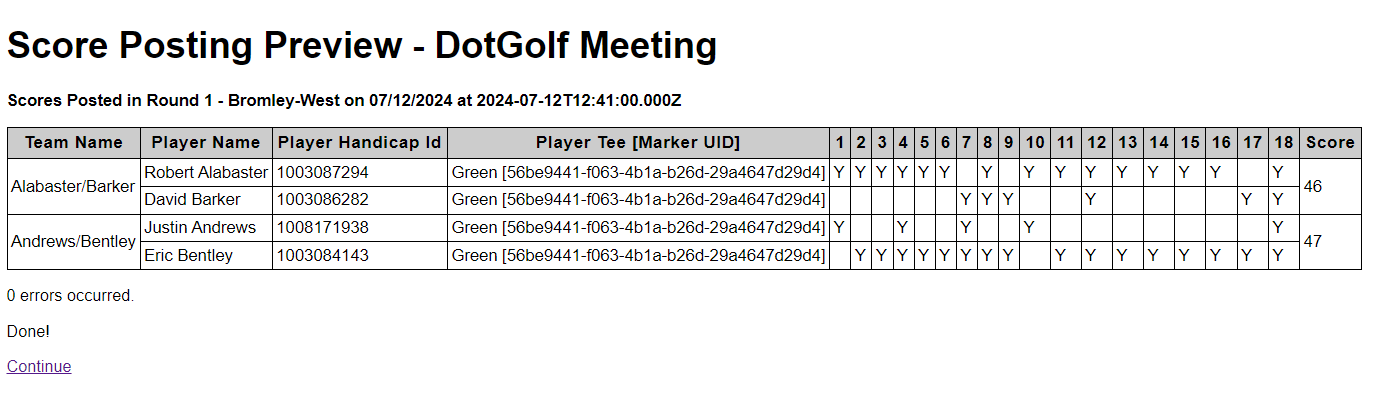
Based on the score posting rules, and the score posting preview we know:
Robert Alabasters score WILL post because the player contributed more than 9 holes, and the team score is more than 42 points
David Barkers score WILL NOT post as the player did not contribute for at least 9 holes
Justin Andrews score WILL NOT post as the player did not contribute for a least 9 holes
Eric Bentleys score WILL post because the player contributed more than 9 holes, and the team score is more than 42 points
Was this article helpful?
That’s Great!
Thank you for your feedback
Sorry! We couldn't be helpful
Thank you for your feedback
Feedback sent
We appreciate your effort and will try to fix the article